A luxuryproperty render.In ten minutes.
Off-plan launches now lead with a 10-second cinematic flythrough. Until last year that needed a film crew. Today, Kling AI Video 3.0 plus a properly briefed Claude prompt produces it for free. This guide walks the workflow, then makes the case for why that changes what your due diligence has to do.
Why this matters
Until late 2024, a cinematic property render meant a 3D studio, a director, and a five-figure invoice. That was the moat. If a developer's launch reel looked expensive, the project usually was too.
That moat is gone. A retail investor with zero design experience can now produce a launch-grade render in about ten minutes for free. So can every other developer marketing team in the market.
Which means the part of due diligence that used to happen unconsciously, judging a project by the polish of its brochure, has stopped working. The brochure no longer signals anything about the underlying investment.
The brochure is the marketing. The numbers are the investment.
What you're building
A 5 to 10-second cinematic video render of a luxury property concept of your choice. Single continuous shot, your choice of camera move, time of day, materials, and aspect ratio. Indistinguishable from the hero asset on a real developer launch page.
The workflow is two prompts and one paste. The whole thing takes about ten minutes.
A free Kling AI account. The Video 3.0 model is available on the free tier. No credit card required for the first few generations.
Claude (free or paid). You'll paste one interview prompt into a fresh chat. The free plan handles this fine.
One account. Three settings.
You only need to set this up once. Free account, the right model, multi-shot off. Everything else is the prompt.
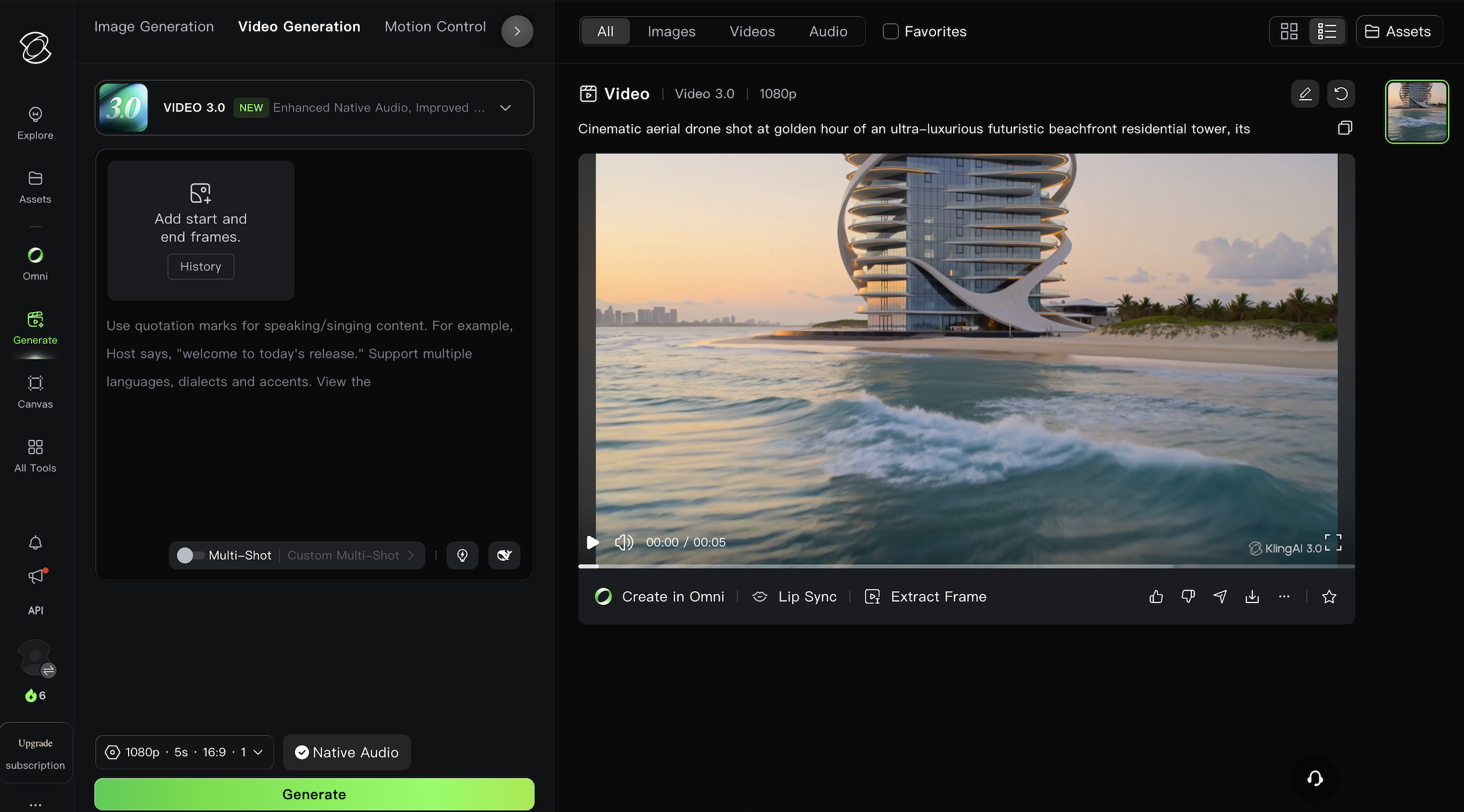
If multi-shot is left on, Kling stitches several camera moves together and the result looks like a montage, not a developer hero render. Keep it off for this workflow. One shot, one move, no cuts.
Your render is only as good as your brief.
Most first attempts at video prompts fail because the prompt is vague. The fix is to let Claude pull the brief out of you before you write a single word for Kling. Open a fresh Claude chat and paste the prompt below.
Paste, click, wait one minute.
Once Claude returns your ready-to-paste prompt, copy it and paste it into the Kling AI prompt box. Select your aspect ratio, click Generate, and wait. Most renders finish in 60 to 90 seconds on the free tier.
Kling has a per-day generation cap on the free tier. If your first variant misses, don't waste credits re-rolling the same prompt. Go back to Claude, tell it specifically what was off (camera moved too fast, materials looked plastic, sky was wrong) and ask for a tightened prompt. The prompt is the bottleneck, not the model.
If I can make this, anyone can.
If a retail investor with no design background can produce a launch-grade luxury render in ten minutes for free, every developer marketing team in the market can produce one in five. Some already do. Most will within twelve months.
Far too many investors get caught up with beautiful brochures and luxury lifestyle branding without properly understanding whether the project is actually a sound investment. That instinct used to mostly work. Production cost was a useful proxy for project quality. It is not any more.
You must conduct proper due diligence beyond the marketing materials if you want to see stronger capital growth and higher-yielding assets in your portfolio. The brochure is the marketing. The numbers are the investment.
If you cannot answer all five of the above for a project in writing, you are not investing, you are decorating. Day 01 of this series gives you the underwrite. Use it.
What AI renders still get wrong.
Three weaknesses worth knowing before you treat any render as a signal of project quality, including your own.
No real-site context
The render does not know the plot. The neighbours, the orientation, the road noise, the actual sunlight angles in August. Kling builds a plausible version of what you describe, not a faithful version of what will be built.
Material fidelity drops up close
Wide flythroughs hold up. The moment you ask for a close shot of a kitchen worktop, a bathroom finish, or a window detail, the model starts approximating. Read every close-up render as concept art, not specification.
Camera moves can lie
A slow rise above a tower makes it look monumental. A push along an infinity pool makes it look private. Camera language sells emotion that the asset itself may not deliver. Notice the camera, not just the building.
How this stacks.
Day 01 installed the underwriter. Day 02 built the strategist. Day 03 is the discipline that makes both of them necessary.
Day 01 underwrites the deal. Day 02 sets the strategy. Day 03 is the reason you need both.
Beautiful marketing used to be expensive. It signalled something. Once it costs ten minutes, it signals nothing. Day 03 is the prompt that proves the old shortcut is gone. The model still works. You just have to run the numbers now.
By the end of session three.
A render in your downloads folder. And a checklist on your screen.
Ten minutes from now you have a launch-grade luxury render, generated for free, that you made yourself. Use it for your own site, your portfolio, your pitch deck, anything.
Then use it as the proof. Every time a developer pitches you on a project with a beautiful flythrough and a thin number, remember you built one in ten minutes too. The brochure is the marketing. The numbers are the investment. Run the numbers.