The AIproperty researchcheat code.
I used to spend most of a day on the research behind every deal I underwrote. Now it takes 30 minutes. One Claude Project per submarket, grounded in five institutional sources, with instructions that block speculation. The setup I run on every new market I underwrite.
Why this matters
Underwriting a submarket properly means reading the last two quarters of macro consultancy reports, the latest submarket data, a year of transaction comps, the supply pipeline, and the track record of every developer active in the area. On a slow week that is a full day of work, before any specific project hits your inbox.
A general AI chat tries to shortcut all of that with training data, and it gets things wrong in ways that look right. Off-plan yields invented, handover delays forgotten, comparable sales attributed to the wrong building. The numbers feel plausible because the model is fluent. They are not plausible because they are not sourced.
The fix is to swap "ask the AI" for "ask the AI inside a project that only knows what you fed it." Claude Projects lets you upload the institutional reports yourself, then write instructions that block the model from answering anything that is not in those documents. The output is grounded, citable, and trustable in 30 minutes instead of half a day.
The AI is not the research. The sources are. The AI just reads them faster than you can.
What you're building
One Claude Project per submarket you are researching. One question, one minute, a sourced answer that cites the exact document and page it came from.
The project knows five things: the macro consultancy reports for your market; the submarket-level reports that zoom in on the area; six months of recent sales and rental evidence; the supply and pipeline data for what is coming; and the track record of every master developer active in the area.
A Claude account. Projects works on Free, Pro and Max. Pro lifts the document upload limits and is what most investors will want once the project has more than two or three reports loaded.
The five sources downloaded as PDFs or spreadsheets. Every one of them is free. The links to the source pages are listed inside each workflow card below.
About 30 minutes for the first project. Five to create the project, fifteen to download and upload the five sources, five to paste the grounding instructions, five to run the first three research questions.
If you want even stricter source-grounding, Google NotebookLM does the same job and physically cannot answer outside the documents you upload. Every claim it returns links to the exact page of the source. Use Claude Projects for the flexibility, use NotebookLM for the rigour. The five-source stack below works in either.
Open Claude. Make a new project.
One project per submarket means the model is never juggling sources from two different areas at once. JGE 2, Dubai South, Business Bay, MBR City: each gets its own project, its own document set, and its own research history.
Five PDFs. Five spreadsheets. The whole submarket.
These are the same documents an analyst at a brokerage or developer would gather before writing a market memo. They are public, mostly free, and replicable for any submarket. Download each one and drop it into the project's Project knowledge panel.
The quarterly residential market reports.
The big real estate consultancies publish free quarterly reports on every major residential market they cover. Headline data on prices, rents, transaction volumes, and the qualitative narrative for what is driving the market this quarter. This is the macro layer that every more-specific question gets framed against.
Download the most recent two quarters from each consultancy that covers your market. They land in the project as the framing context for everything else you ask.
The area-level cut.
Macro reports cover the whole city; submarket reports zoom into the specific area you are underwriting. Supply within a 2 km radius, off-plan share by community, average ticket size by tower or villa cluster. The detail that a citywide median price hides.
Whatever your market has, drop the most recent two or three into the project. That might be area-specific reports from research firms, neighbourhood spotlights from the larger consultancies, or community-level pages on the public aggregators.
Real sales, real rents, real square footage.
Every transaction that closed in the last six months in the submarket. Sale prices, rental contracts, by building, by date, by size. This is the comparables substrate. It is what tells the project whether the asking price on a new launch is in line with the area or 20% over it.
Filter to the submarket, set a six-month window, and export as a CSV. The model parses it as a table and can answer comp questions directly against the rows.
What is coming.
How many units are launching in this submarket over the next 24 months, when they are scheduled to complete, and which developers are responsible. Without it, a yield calculation is a snapshot that misses the wave of new inventory about to land.
Pull the off-plan launch schedule for your submarket, and the developer-by-developer completions calendar for the next two years. One spreadsheet is enough.
Last five completed projects, promised versus actual.
For each master developer active in the submarket, build a one-page table. Columns: project name, year launched, promised handover, actual handover, marketed spec, delivered spec, current resale versus original off-plan price. Five rows per developer. This is the single best predictor of whether a new launch from the same developer will hand over on time, in spec, and at the value promised.
Half an hour per developer the first time; near zero thereafter, because the same names come up across every submarket.
Tell Claude what it cannot do.
Uploading the documents is half the work. The other half is writing the project instructions that force the model to use them and only them. This single paste turns the project from "an AI chat with some files attached" into a research analyst that refuses to speculate.
Claude Projects enforces these rules through instructions and your own discipline. If the model still slips and quotes an outside figure, paste the rules into chat once more and ask for the source. Google NotebookLM enforces this structurally: it physically cannot answer outside the uploaded documents, and every claim ships with a clickable citation. The five-source stack works in either; use NotebookLM if your team needs the harder guarantee.
Ask in plain English.
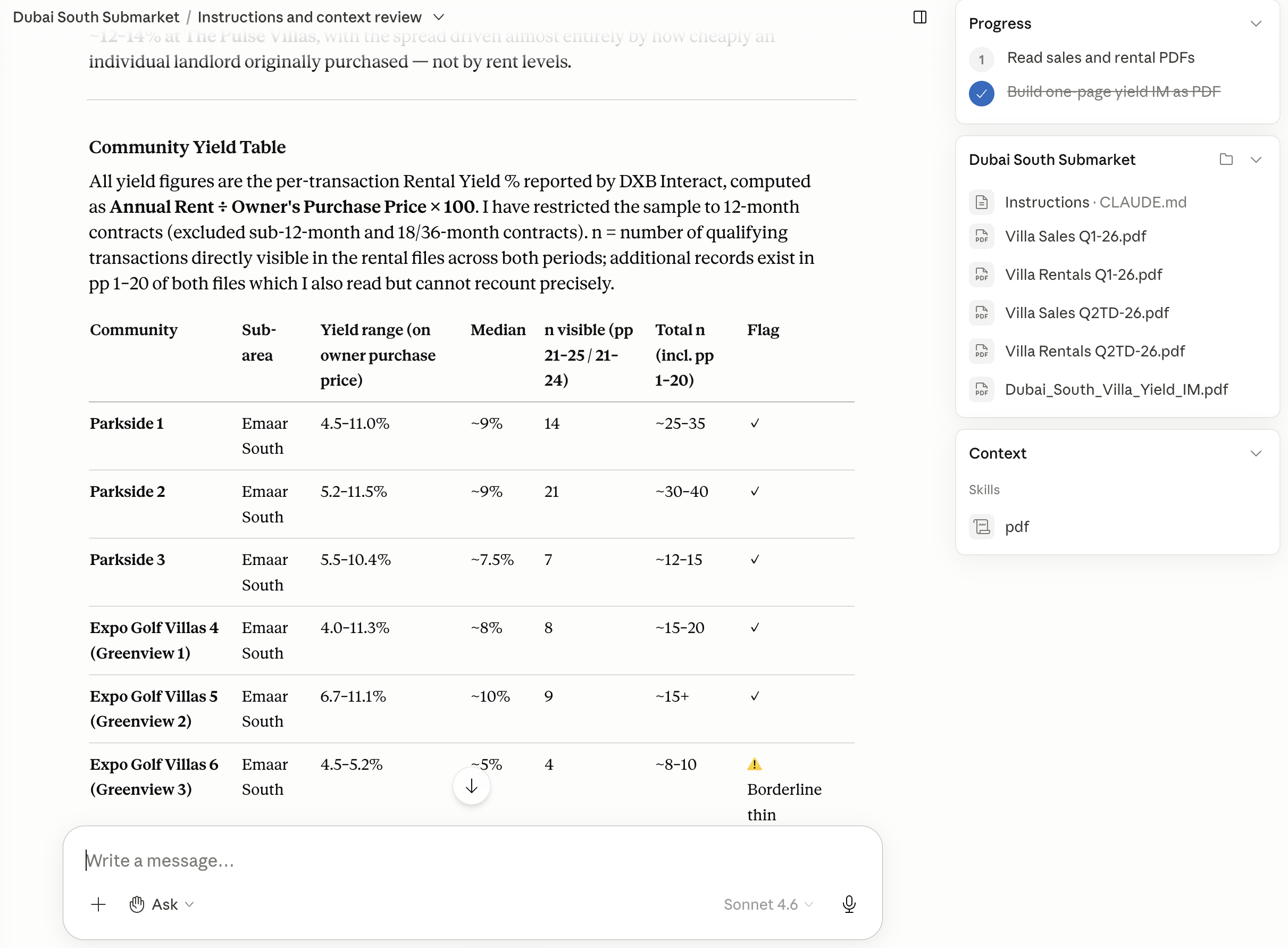
With the method baked into the instructions, you do not need to engineer clever prompts. You ask the way you would ask a colleague, and the answer comes back calculated and cited. The question below is the one I run first for any submarket I am underwriting, and it is one sentence long.
 Cited output
A gross yield table for a submarket, sourced entirely from the uploaded transaction and rental data. Every number cites the row or page it came from.
Ask for it as a one-page IM.
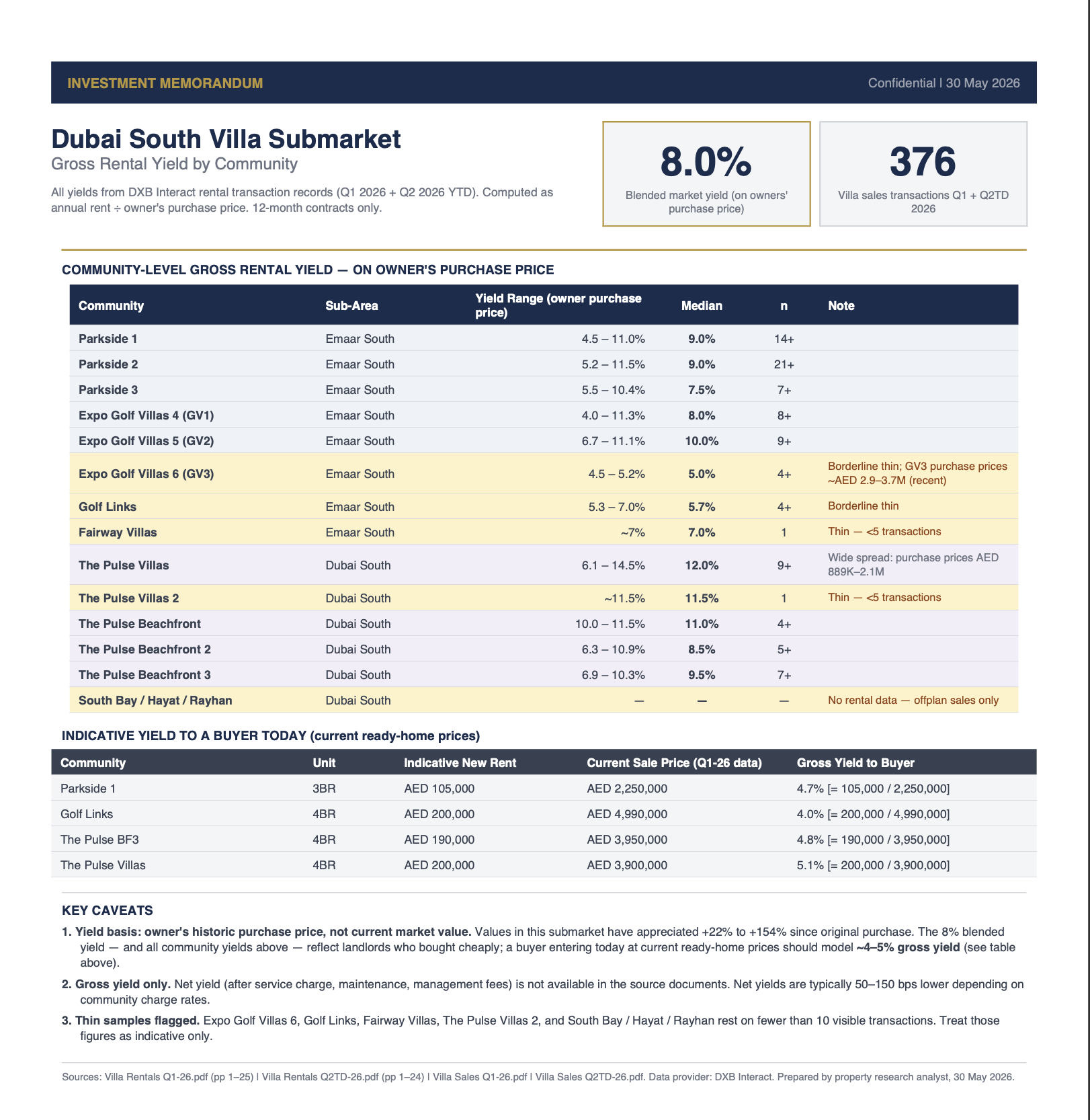
A cited table inside a chat is the analysis. A one-page investment memorandum is what you actually send to a co-investor, a partner, or your own future self. The project will write that memo for you, in the same plain-English asking pattern, and keep every citation from the underlying table.
 Exported memo
The same yield analysis, reshaped into a one-page memo. Headline metric, evidence table, buyer-today reframing, key caveats. Every figure still cites the file it came from.
Once the yield loop runs cleanly, the same project answers the rest of the underwrite, and you keep asking in plain English. A few to try: "What is the supply pipeline here over the next two years?" · "How do the active developers compare on promised versus actual handover?" · "What are service charges like across the buildings here?" Each is one casual sentence, and each one can be exported as its own one-page memo the same way.
What this does not do.
Four limits worth knowing before you treat the project as the source of truth.
The source quality is the ceiling
The analyst is only as good as the PDFs you fed it. A six-month-old market report or a missing developer track record leaves a gap the model will, correctly, refuse to fill. Refresh the sources every quarter, or every time a new RERA report drops.
DLD data has a lag
Transactions usually surface in the public portal 30 to 60 days after they close. The trailing 12 months are accurate; the trailing 30 days are not yet complete. The project will quote whatever is in the file, so refresh the export before any time-sensitive decision.
Service charges drift
The Mollak schedule for a building can move 5 to 15% year on year, and a two-year-old number is already wrong by enough to swing a yield calc. Pull the latest approved schedule when you start a new project, and re-pull when you re-underwrite.
It cannot walk the area
The project can tell you that a community has a 6.2% gross yield and a 30% off-plan share. It cannot tell you that the school next door has a five-year waiting list, that the road in floods every November, or that the marketing renders show trees the master plan does not pay for. Visit the area. The project is the prep, not the decision.
How this stacks.
Day 01 installed the underwriter. Day 02 built the strategist. Day 03 made you check the marketing claims. Day 04 wired the five MCPs. Day 05 installed the Small Business plugin. Day 06 turned it into a property manager. Day 07 gave you the three prompts that stop AI lying. Day 08 turns those prompts into a permanent project per submarket, with the source stack underneath that makes the rules enforceable.
Day 07 was the rules. Day 08 is the project that enforces them.
Day 07's prompts work in any chat. Day 08 makes them structural: the five sources are uploaded once, the rules are pasted once, and every research question you ask after that runs against the same grounded substrate. Later entries in the series build on this same project: a submarket that already knows itself is the right place to drop any specific deal you are about to underwrite.
By the end of your first week.
One project per submarket. One sourced answer per question.
By the end of your first week with this setup, you have one Claude Project for each submarket you are actively researching. Each one knows the same five sources. Each one will refuse to invent a number it does not have a citation for. A research question that used to take most of a day comes back, sourced, in 30 minutes.
The shift is not that AI does the research. It is that the research finally has one place to live, with one set of rules, and one analyst that has read everything you have uploaded. You keep the judgement. The model keeps the receipts.