Your off-plancomp desk.Inside Claude.
The brochure tells you the price. Nothing in the launch room tells you whether it is the price. Day 11 installs the comp desk that answers the question every off-plan buyer skips, in ten minutes, per typology, with a model, a memo and a live tracker at the end. An institutional analyst stack, run on a Pro subscription.
Why this matters
Off-plan launches sell on emotion. A render of the golf course, a hotel partner, a payment plan that arrives by WhatsApp at 9pm on a Sunday. The valuation question, whether the price is fair against the rest of the market, gets answered by the developer's own pricing slide.
An institutional buyer never accepts that. They run two comparable exercises per typology before they consider an offer: one against ready properties to assess growth potential, one against recent launches to assess pricing position. Then a returns-to-handover model, then a written memo. None of that is exotic. All of it lives behind a paywall most retail buyers never get to.
The Anthropic Financial Services plugin closes that gap. It ships with a market-researcher agent and a comp-analysis skill that, briefed correctly, produces the same artefacts an investment committee would expect: an Excel model with a tab per typology, an assumptions tab, a summary dashboard, and a written investment memo.
The brochure tells you the price. The comp desk tells you the value.
What you're building
A three-artefact deliverable per launch you analyse. An Excel model. A written investment memo. A live tracker dashboard.
The Excel structure: launch psf, ready-comp psf, premium to comp, returns under downside, base and upside scenarios, breakeven growth required, and a verdict on whether the typology represents value relative to the rest of the launch.
The memo structure: executive summary, developer assessment, project overview, market context, payment plan, per-typology analysis, cross-comparison ranking, risk matrix, overall recommendation.
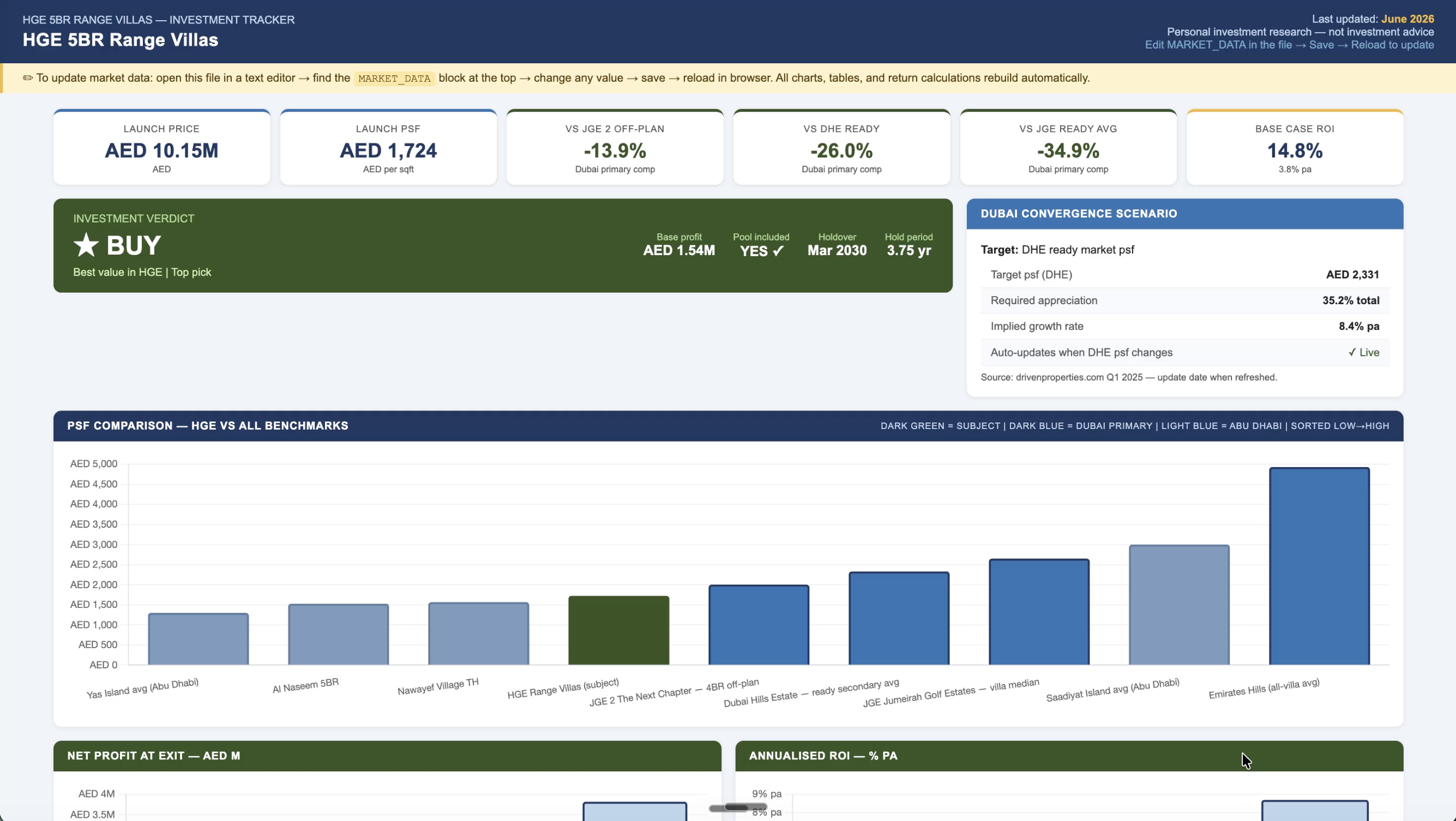
The live tracker: an updatable dashboard that re-scores the launch every time a new comparable lands in the same submarket. Drop in the new brochure, ask Claude to refresh, and the comp deltas update against the original analysis.
Claude Pro or Max, to access the Financial Services plugin, Co-work, and file uploads.
The launch document pack: developer track record, master plan brochure, every individual unit-type brochure, the pricing sheet, the sizing schedule, and the payment plan.
About ten minutes from install to running output, plus the time to read the memo Claude returns.
Financial Services. One install.
Anthropic's Financial Services plugin ships with the agents and skills an investment desk would normally pay six figures a year to license. Comp analysis is one of them. The install takes under a minute and lives inside your existing Claude account.
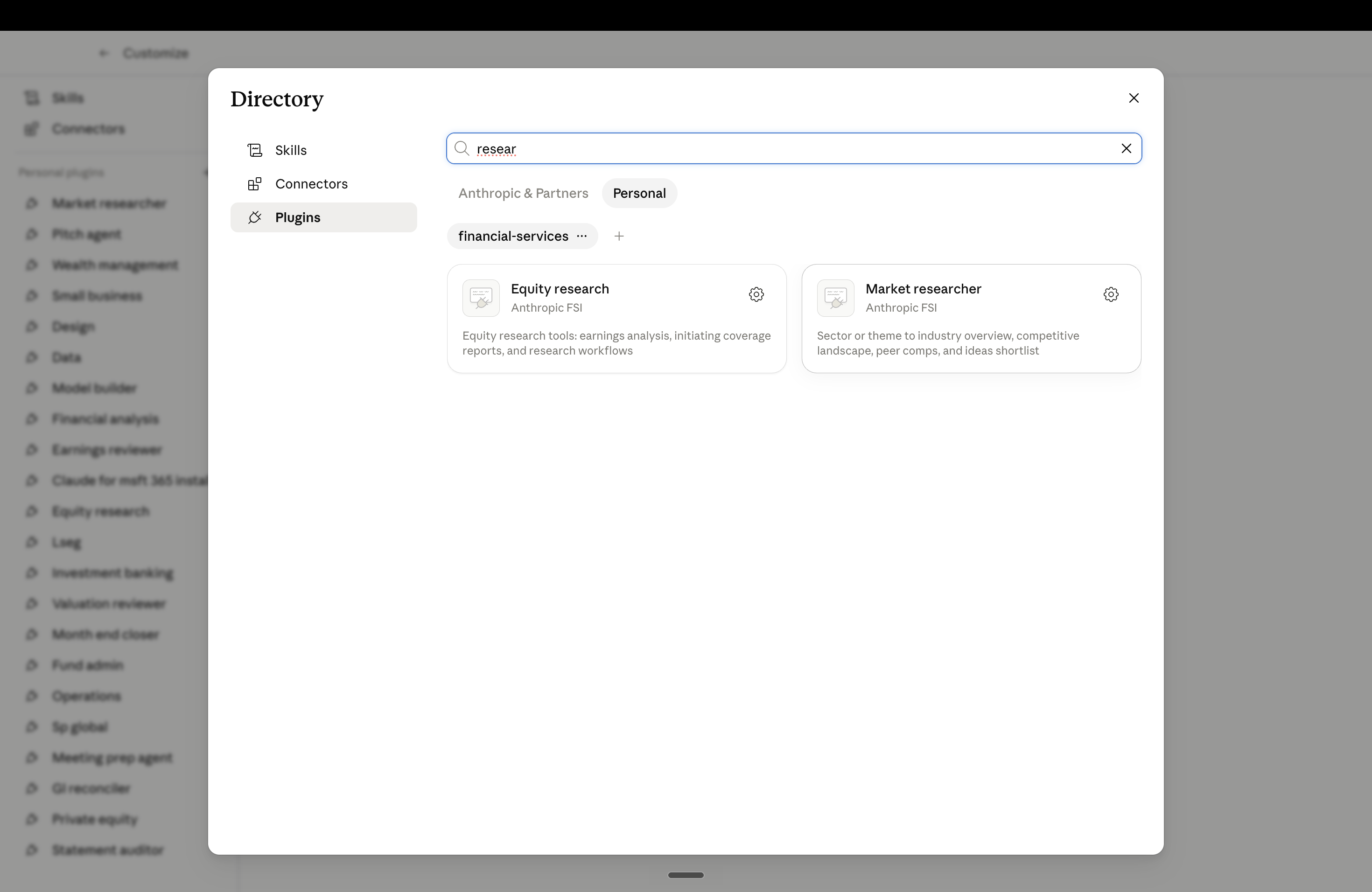
The Financial Services plugin requires Claude Pro or Max. The free tier does not see the marketplace or the agents inside it. If you are on Free, the workflow stops at this step.
Market researcher. Comp analysis.
The Financial Services plugin bundles multiple agents, each with their own skills. The fastest way to find what is inside is to ask Claude directly. The same trick works on any plugin you have installed.
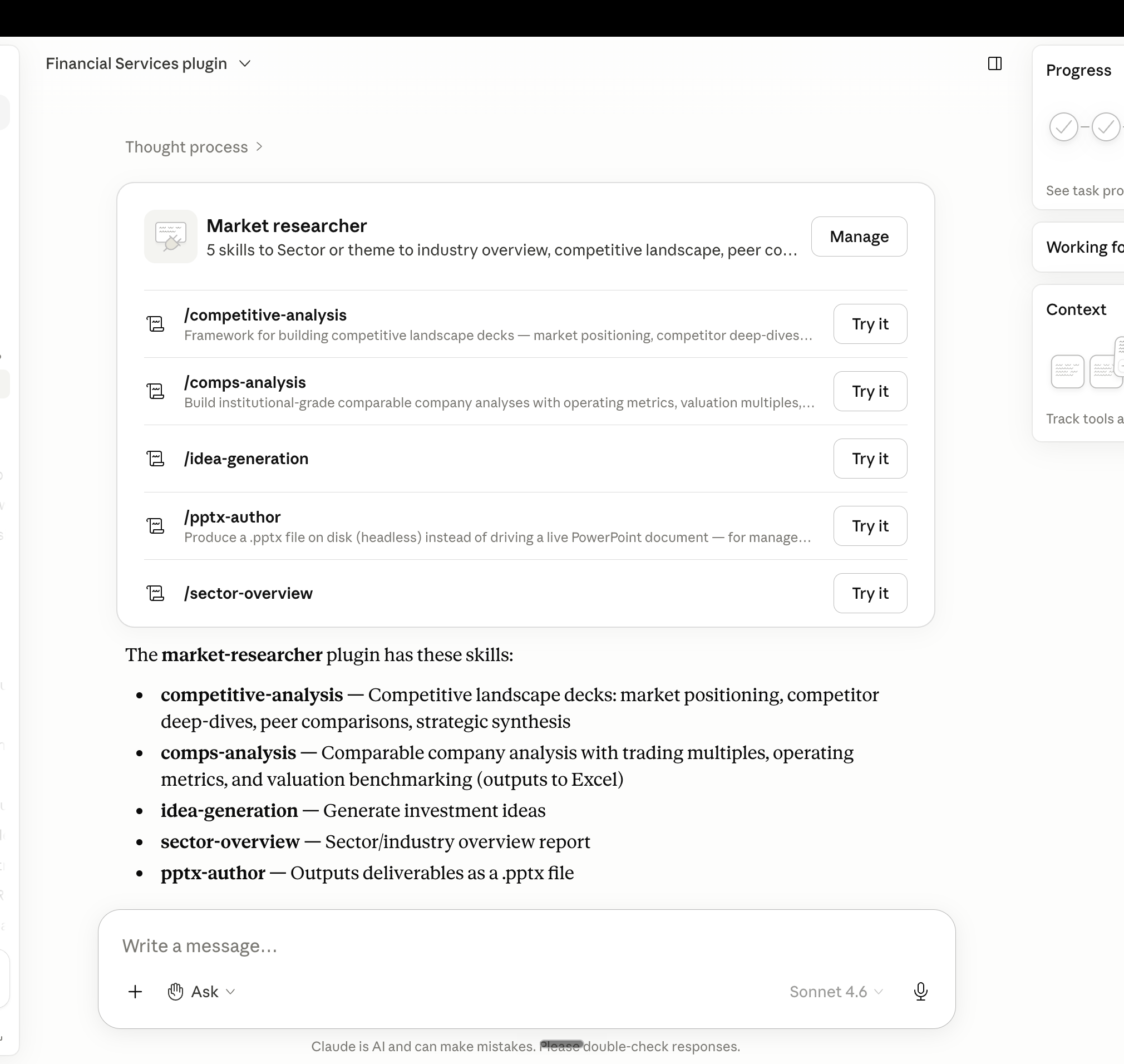
Every plugin Anthropic ships works the same way. Ask Claude what is inside it. You will find agents and skills the documentation does not surface, including ones built for adjacent use cases that map cleanly to property work.
Paste the master prompt.
The comp-analysis skill was originally designed for equities, so it asks a few setup questions before it begins. The most important one asks whether you have a preferred template or existing data to work from. You answer it by pasting the master prompt below, which is what converts the generic equity workflow into a property investment workflow.
It tells Claude three things the default skill does not assume. Separate every typology. Run two comp exercises, not one. Write in committee style, with facts separated from assumptions. Without it, you get a thin generic write-up. With it, you get the artefact a desk analyst would have produced.
Every document. One folder.
Once Claude is briefed, point it to the folder where you have gathered the launch materials. The more complete the pack, the sharper the verdicts. Skip the brochure pack and Claude is forced to estimate from public data. Provide it all and Claude triangulates between what the developer has stated, what the comp set is doing, and what the numbers actually support.
The named project pack.
Ask the broker or developer sales agent for the full set. The brochure alone is not enough. Aim for the same documents an underwriter would pull before signing the SPA.
- Developer track record · recent completed projects
- Master plan brochure · community + phasing
- Every unit-type brochure · spec, finishes, amenities
- Pricing sheet · per typology, per unit
- Sizing schedule · sqm and sqft per typology
- Payment plan · milestones + handover balloon
A work plan. Then the work.
Claude reads the full pack and builds a numbered plan before running anything. You can see the steps tick off live as the agent researches comps, pulls market data, builds the model and writes the memo.
- Read all source materials
- Research ready property comps
- Research recent off-plan launch comps
- Pull market data, yields, growth
- Build the Excel financial model
- Write the investment memo
- Build the live tracker dashboard
- QA and verify outputs
The single biggest determinant of how useful the output is, is the completeness of the upload. Floorplans, renders and site maps count. Claude reads images, not just text, and pulls quality differentiators from the visuals (pool inclusion, plot orientation, basement spec) that often justify or undermine the headline psf.
Excel. Memo. Live tracker.
The output is three artefacts. An editable Excel model with one tab per typology, an assumptions tab, and a summary dashboard that compares every typology side by side. A written investment memo in committee style. And a live tracker dashboard that you can update as new comparable launches drop in the same submarket.
Assumptions tab. Payment plan structure, holding period, transaction costs, return scenarios with rationale, market context with sourced citations.
Summary dashboard. Every typology side by side. Property details, pricing at launch, comparable analysis (ready + off-plan), and full return analysis under downside, base and upside scenarios.
Per-typology tabs. Property details, full payment schedule by milestone, return-to-handover analysis, sensitivity scenarios.
Executive summary. One-page table of the launch with launch psf, premium to ready comp, premium to off-plan comp, and a one-word assessment per typology.
Developer assessment. Market cap, total assets, track record, risk flags.
Market context. Sourced data points (Knight Frank, ADREC, Bayut, Property Finder) for the relevant submarket.
Per-typology deep dive. Two comp exercises, return-to-handover model, and a buy / caution / avoid assessment.
Cross-comparison ranking matrix. Every typology scored across growth potential, exit liquidity, risk level, leveraged ROE, value vs comparables, then ranked overall.
Risk register and overall recommendation. Including a "key information gaps" section flagging what the analysis could not verify from the documents provided.
Updatable, not static. The tracker dashboard holds the original comp analysis. When a new comparable launch lands in the same submarket, you drop the brochure into the folder and ask Claude to refresh. The tracker re-scores your launch against the new comp and surfaces what moved.
Why this matters. Your launch's pricing position drifts as the market moves around it. A live tracker means the comp analysis stays useful between the moment you reserved and the moment you decide whether to flip at handover.
Both artefacts are research outputs. The memo carries a "personal research, not investment advice" disclaimer on every page for a reason. The decision is still yours. What changes is the depth of the file you are making the decision from.
What this does not replace.
Four limits worth knowing before you treat the verdict as the answer.
It does not visit the site
Construction quality, fit and finish, the actual feel of the community, neighbouring noise: none of this lives in a brochure. The comp desk is the desk research layer. A site visit is still the one thing no AI substitute exists for.
Plot orientation can swing the number
In golf and waterfront communities, plot premium between a corner unit with the right view and an interior unit with no view can be 15 to 30%. The brochure rarely shows individual plot layouts, so the comp desk assumes an average. Pin down the specific unit before you sign.
Live agent intel still matters
The published asking price and the actual selling price diverge during a hot launch. Brokers know what units traded over and under list. The comp desk uses public data. Cross-check the headline psf against what brokers say is actually clearing before you treat the verdict as final.
It is not legal review
What the SPA actually commits you to, what the developer can and cannot substitute, what the escrow protects: that is the lawyer's work. The comp desk decides whether the number is right. The lawyer decides whether the contract is right.
How this stacks.
Day 01 builds the underwriter for the property you already own or are buying. Day 09 builds the analyst that protects a single off-plan unit from handover delay, spec downgrade and developer default. Day 11 puts a comp desk at the launch room door, before any of that is on the table.
Earlier days protect what you are about to buy. Day 11 decides whether you should.
An off-plan reservation is the single largest unhedged decision most retail investors make. The comp desk you build today answers the question that decides whether the deposit is sensible at all, before the diligence layer underneath it ever gets used. The cost of running it is one Claude Pro subscription. The cost of skipping it is paying a launch premium that turns out to be larger than the headline yield.
Ten minutes to the memo.
One Excel. One memo. One live tracker.
Inside ten minutes you have an Excel model with every typology in the launch side by side, every premium to ready and to recent off-plan launches quantified, and a verdict on which typology offers the strongest investment case.
You have a written investment memo in committee style: developer assessment, market context, per-typology deep dive, cross-comparison ranking, risk register and an overall recommendation with the gaps flagged.
And you have a live tracker dashboard that re-runs the comp analysis whenever a new launch lands in the same submarket. The work an analyst would have charged a fee to write, that stays current once it is built.