Your propertymanager.Inside Claude.
Day 05 installed the plugin. Day 06 puts it to work. Three property-specific workflows on the books you already keep, then one live dashboard that pulls all of it onto a single page. The version of property management you would have built yourself, if you had the time.
Why this matters
A managing agent on a single UAE unit typically runs 5% of the gross rent, or about AED 4,000 to AED 8,000 a year on a one-bedroom rented at AED 80,000 to AED 160,000. Across a small portfolio that is a salary nobody talks about, and it buys you property tours, rent collection, and a slow email reply.
The Small Business plugin that Anthropic shipped on 13 May 2026 hands the financial half of that role back to you. Cashflow timing, period-end accounts, and yield analysis are exactly the work that benefits from an analyst who never gets tired, never loses the spreadsheet, and never forgets which property is which.
This guide takes the install from Day 05, asks Claude where it would actually pull its weight on a property portfolio, and ends with a dashboard built from the answers.
You do not need to appoint a manager. You need the right skills installed.
What you're building
Three saved workflows inside Claude and one HTML dashboard sitting on top of them. One question a week, three minutes of reading, the whole portfolio in front of you.
The workflows: a rolling cashflow forecast, a per-property profit and loss for each month or quarter, and a yield analysis that ranks every unit by ROI and stress tests rent and cost changes.
Claude Pro or Max, with the Small Business plugin installed from Day 05.
The same five tools from Day 04: accounting (Xero or QuickBooks), DocuSign, your property portals via Apify, your property management software via Zapier, and a CRM such as HubSpot.
About 30 minutes. Ten to confirm the use cases, ten to wire any tools you have not connected yet, ten to render the dashboard.
Start from Day 05.
This guide assumes the Anthropic Small Business plugin is already installed in your Claude Co-Work. If it is not, the install takes about five minutes and is covered end to end on the Day 05 page.
One question. Three use cases.
Instead of guessing which of the 15 workflows matters for property, ask Claude. Paste the prompt below into a Co-Work chat with the Small Business plugin enabled. Claude reads the workflow library and returns the three use cases that actually map to a landlord's job.
Cashflow. Close. Yield.
Three workflows, drawn from the plugin's library, repointed at a property portfolio. Run them in order. Each one builds on the connectors the previous one already needed.
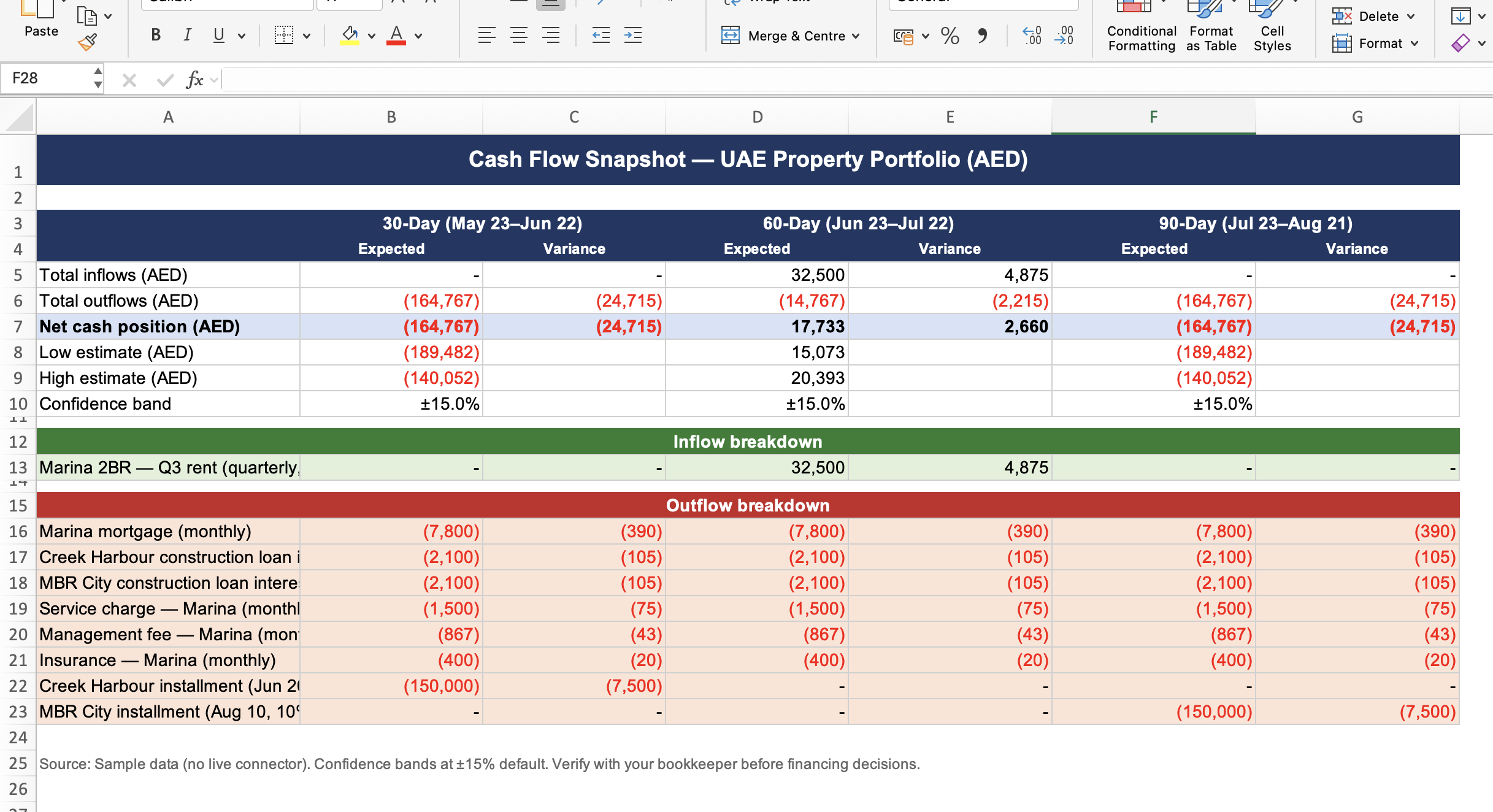
Every payment in, every payment out, on a single line.
Claude reads your rental income timing from accounting, your mortgage and service-charge schedules from the documents you have signed, your maintenance spend from invoices, and your vacancy gaps from your CRM or property management software. It returns a rolling cashflow forecast for the next 30, 60 and 90 days, per property and consolidated.
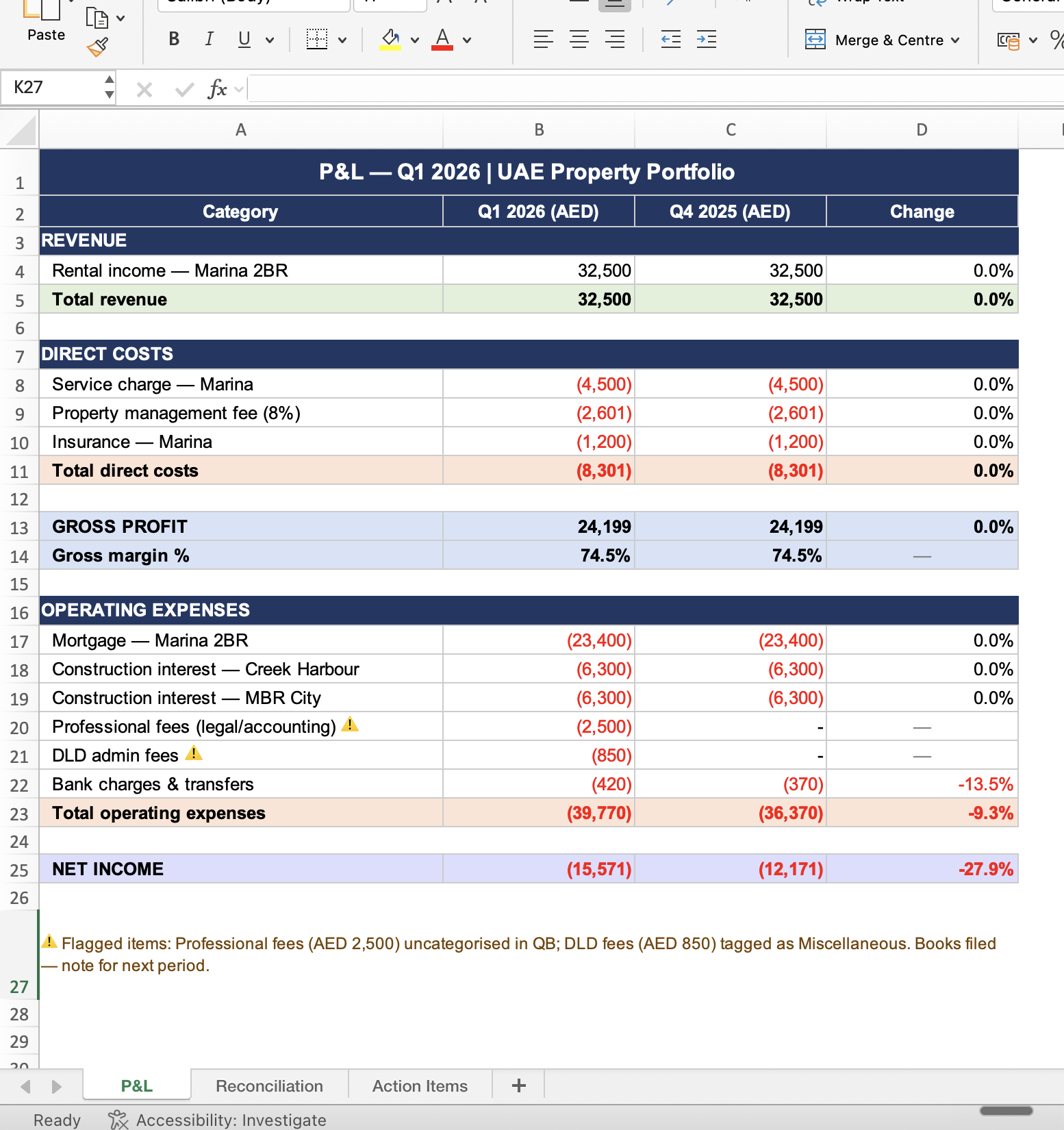
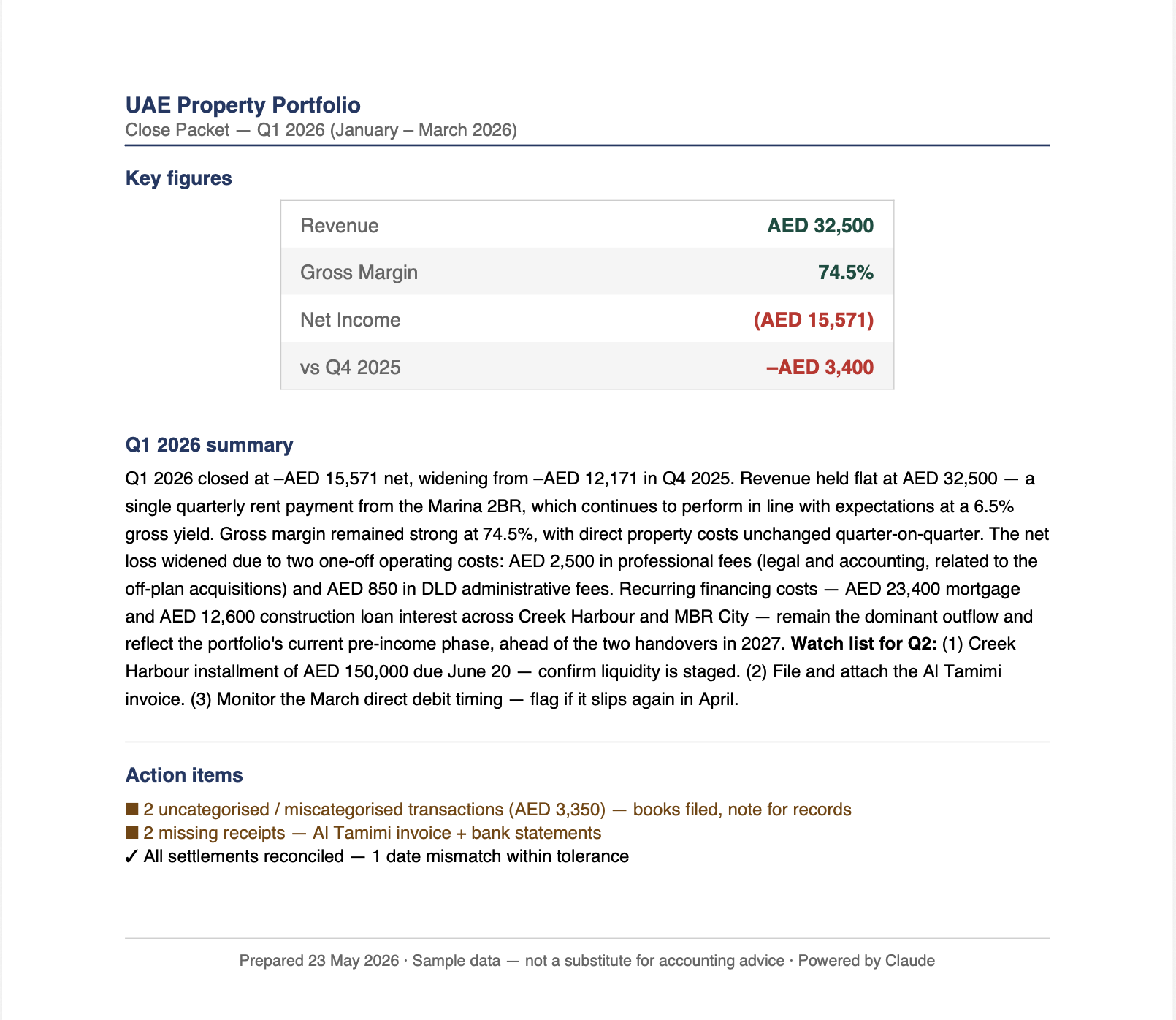
Your books, per property, ready for the accountant.
The plugin's standard period-end workflow, repointed at a portfolio. It reconciles rental income against expenses, separates repairs from capital improvements, surfaces any uncategorised transactions, and drafts a profit and loss summary for each property. The output is the prep your accountant works from, not the final submission.
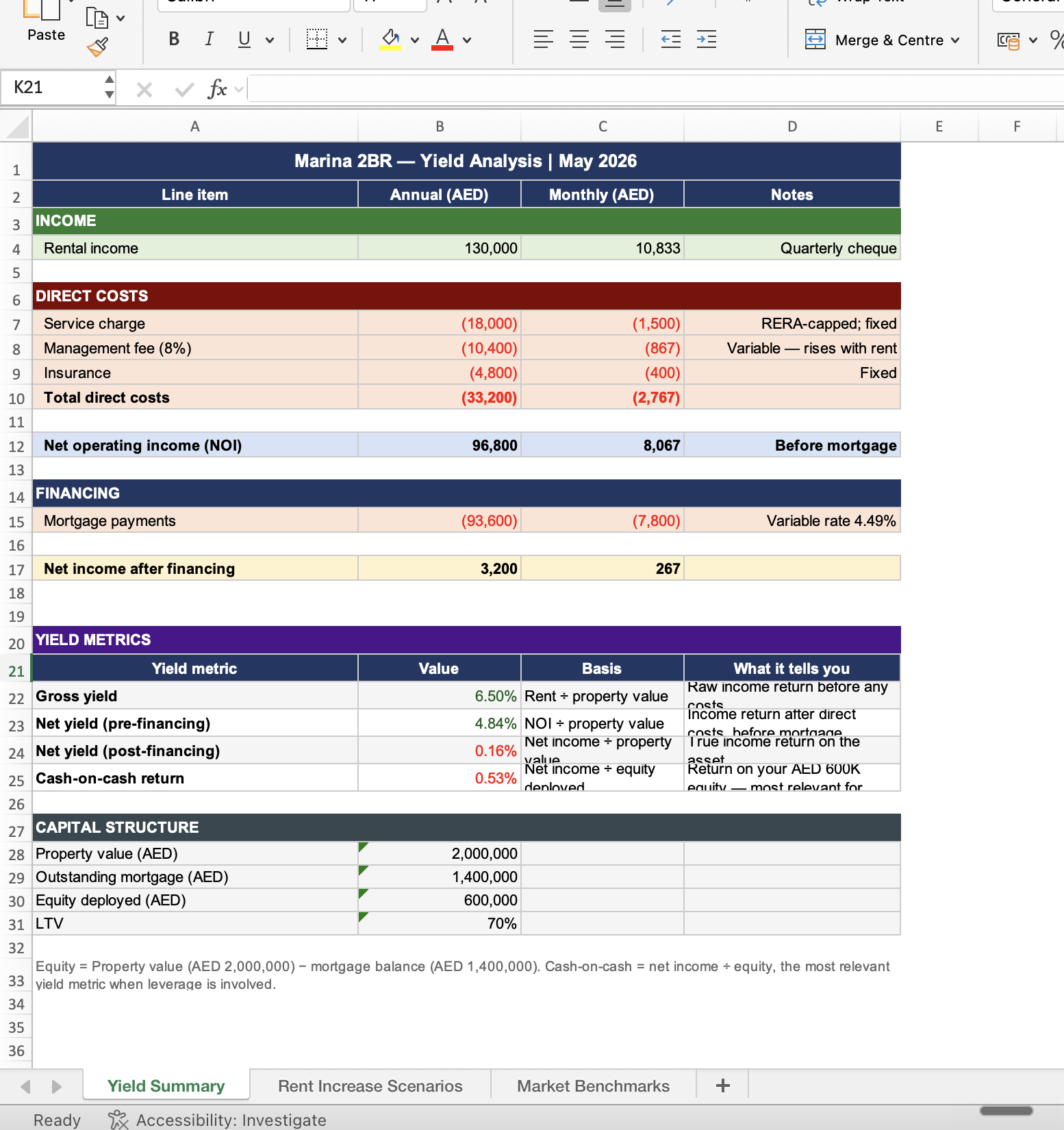
Net yield by unit, stress-tested.
Claude computes a net yield for each property in the portfolio, ranks them by ROI, and then stress tests two variables: a rent change up or down by 5% and 10%, and a cost-inflation increase across service charges and maintenance. The output tells you which unit is doing the heavy lifting and which one is closest to breaking even.
Connect once. Run anything.
Each of the three workflows above needs the underlying data to actually compute. Accounting carries your income and spend. Your property management software carries your tenancy and maintenance dates. Your CRM carries your tenant and prospect comms. Connect them once inside Co-Work and every future Claude question can reach them.
Already in the plugin.
These ship as direct integrations inside the Small Business plugin. Authorise them once from Co-Work's plugin settings.
- Xero or QuickBooks · accounting
- DocuSign · contracts
- Google Workspace · mail, drive, calendar
- HubSpot · tenant + prospect CRM
Routed via the Day 04 MCPs.
Property portals and property management platforms do not have native plugin support. Day 04 covered the two MCPs that bridge that gap.
- Property portals · via Apify MCP
- Buildium · via Zapier MCP
Claude inherits your existing permissions. If your Xero login cannot see a property, neither can the plugin. The same applies to anything you delegate later: a contractor or assistant added to the chat only sees what they could already see in the underlying tool. The plugin operates inside the doors you already have keys to.
Three workflows. One page.
Co-Work ships with a /build-dashboard skill that renders an HTML page from any structured output. Point it at the three workflows above and it stitches them into a single portfolio dashboard you can open in any browser.
A walkthrough of the page Claude rendered on a mixed portfolio of Dubai and UK rentals. One file. Three workflows. The whole estate on a single screen.
The first render almost always needs one revision pass. Ask Claude to tighten the spacing, swap a chart for a table, or add a column. The skill keeps the file open in context, so each follow-up rebuilds the same page rather than starting from scratch.
What this does not replace.
Four limits worth knowing before you treat the dashboard as the source of truth.
It does not show flats
A managing agent does viewings, vets tenants, and handles the late-night key handover. The plugin does none of those. The job it replaces is the financial half: the part that lives in spreadsheets, statements, and signed PDFs.
It does not file your taxes
The month-end close drafts a per-property P&L and surfaces anomalies. Your accountant still needs to sign off on the final submission. Treat the dashboard as the prep, not the return.
Bad inputs break the page
If your accounting software has uncategorised transactions or your CRM is missing tenant names, the dashboard will inherit those gaps. The first two renders are usually a data-cleanup exercise in disguise.
The skill is not free of friction
The first build typically needs one or two prompts to tighten layout, fix a missing chart, or add a column. Budget twenty minutes for the first run. Subsequent re-renders take seconds.
How this stacks.
Day 01 installed the underwriter. Day 02 built the strategist. Day 03 made you check the marketing claims. Day 04 wired the five MCPs. Day 05 installed the Small Business plugin and ran the first weekly pulse. Day 06 turns the same plugin into a property manager by running three specific workflows and rendering them as a single dashboard.
Day 05 was the install. Day 06 is the artefact.
Day 05 gave you a chat that can pull from your tools. Day 06 turns that chat's output into a page you can come back to. The dashboard is the part of property management that most landlords pay an agent for, repackaged as an HTML file that you own and re-render whenever the numbers move.
By your first month-end.
A single page. Refreshed in seconds.
By the end of your first full month running this setup, the dashboard will know which property is your strongest, which is closest to a yield cliff, and which month is going to be tight on cash. The three workflows will run on a schedule. The page will rebuild on demand.
The shift is not that Claude becomes a property manager in the traditional sense. It is that the financial layer of property management stops costing you a percentage and starts costing you the price of a Pro subscription. You keep the rest of the rent.